HealingMatgo Opponent Speech Bubbles, Commentary and Greetings: How to Turn Opponent Chat Off and On
The opponent characters in HealingMatgo do not just play their cards in silence. They are happy when they take a good card, annoyed when they fall behind, and greet you when they meet you after a long time. In this article we walk you through when opponent speech bubbles, commentary, greetings and feature tips appear, and how to turn them off if they feel noisy.

1. What do they say?
| Type | When does it appear? | Example feel |
|---|---|---|
| Emotion bubble | When you score big or the opponent takes a good card, or when you are behind or ahead | Being happy, being annoyed, being nervous, giving up |
| Commentary | When a combination like Godori is completed or the flow of the round changes | Lines that point out the round, like “Ah~ you made a Godori.” |
| Greeting | When a round starts | The greeting differs between when you first meet and when you meet again after a long time |
| Feature tip | When you hover the mouse over a button or box on the start screen | Briefly tells you what that feature is |
The way the bubbles talk differs by the opponent’s gender and age. Even in the same situation, Cheolsu and Grandma Sunja speak differently. The gods in War of the Gods speak like gods.
Opponent characters speak only based on information already visible on the screen (table cards, captured cards, cards left in the deck, score and Go count). They never say anything that reveals your hand, the opponent’s hand or cards inside the deck. The bubbles are not hints that give you the answer.
2. They greet you when you meet again after a while
When a round starts, the opponent greets you. The words differ depending on whether you have just met or played recently. If 3 hours or more have passed since you last met, a reunion greeting like “Long time no see” appears, sometimes with how much time has passed or last time’s result. In a round that follows right away, they do not greet you every time, and if they have already greeted you in this session, they do not do it again.
3. Hover the mouse on the start screen and it explains
On the waiting screen before a game starts, if you hold the mouse for about 1 second over the ☰ button, the share button, Ad inquiries, your HP, the ticker board, the Hall of Legends, items, the game mode buttons and so on, the opponent explains it in a speech bubble. Each feature is explained only once. The content is a short version of the same facts as in the arrow guide that appears when you first start.
During a game, if you stare quietly at the opponent’s hand, the opponent may react playfully. Also, if you use a peeking item such as Deck Peek or Opponent Peek, the opponent may react by being flustered or annoyed. It is only a reaction, and the opponent’s cards do not change.
4. The remember-me feature and self-learning phrases
- Remember-me feature – habit statistics such as whether you Stop early or call Go often, along with the number of rounds you played and your wins and losses, are recorded on this computer and used in conversation. As the number of rounds builds up, your relationship with the opponent moves from first meeting to familiar to regular, and the way they speak changes too.
- Before enough rounds have been played, they speak carefully, like “You seem like this kind of style”, and only after a certain amount builds up do they speak confidently. When there are few rounds, they do not make assumptions.
- Self-learning phrases – new sentences are made by joining basic lines for the same emotion or adding interjections that suit the speaking style. Only sentences that have been checked for length, banned words and phrases that reveal hidden cards are saved.
This memory and the learned phrases are saved separately for each profile and only on this computer. They are not sent to the server.
5. How to turn it off and on – ☰ → “Opponent chat settings…”
If the speech bubbles bother you or you want things quiet, press “Opponent chat settings…” in the ☰ menu at the top left. The settings window opens, and everything starts as “On”. The values you change stay even after you close and restart the game.
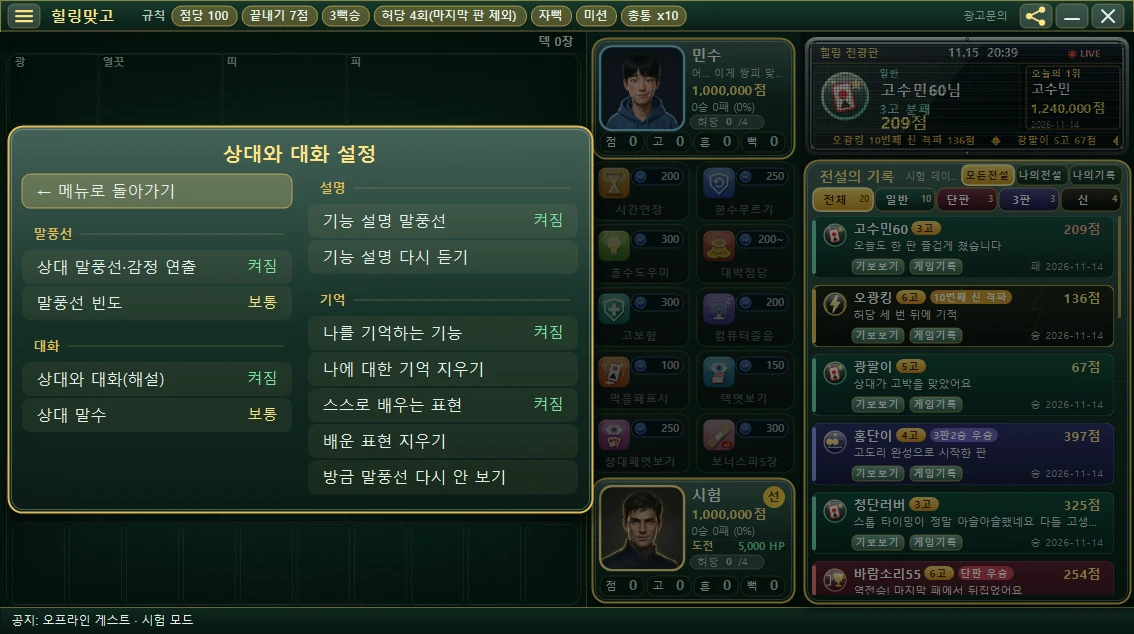
| Group | Item | Values you can pick |
|---|---|---|
| Bubbles | Opponent bubbles & emotes | On / Off (turning it off turns off the bubbles, emotion sound effects and flashes) |
| Bubbles | Bubble frequency | Often / Normal / Rarely |
| Chat | Opponent chat (commentary) | On / Off |
| Chat | Opponent talkativeness | Low / Normal / High |
| Tips | Feature tip bubbles | On / Off |
| Tips | Replay feature tips | Press to hear the explanations again from the start |
| Memory | Remember-me feature | On / Off (turning it off means no habits are built up and nothing is said about them) |
| Memory | Clear memories about me | Press, then after confirming, all habit, memory and relationship records are cleared |
| Memory | Self-learning phrases | On / Off |
| Memory | Clear learned phrases | Press, then after confirming, learned phrases are cleared (the basic lines stay) |
| Memory | Hide this bubble from now on | Makes the line that just appeared stop showing from now on |
“Clear memories about me” and “Clear learned phrases” cannot be undone once cleared. They are not cleared immediately when you press them, because a confirmation window appears first, so read it and choose “Clear” or “Keep as is”.
If you press “← Back to menu” at the top of the “Opponent chat settings” window, the main menu opens again. You can see the whole menu structure in the ☰ menu settings article.