How to Change the Language in HealingMatgo: Choosing Korean, English or Japanese
You can enjoy HealingMatgo in three languages: 한국어 · English · 日本語. It is handy for introducing the game to family or friends abroad, and you can change the language any time. This article explains which language you start with when you first install, where to change it, and what changes and what stays the same.
1. Which language do I start with?
When you first install, the installer looks at the country you are connecting from and decides the starting language.
| Country you connect from | Starting language |
|---|---|
| Korea | Korean |
| Japan | 日本語 |
| Other countries | English |
- When the country cannot be determined (for example when the internet is down), it follows the Windows display language. Korean for Korean, Japanese for Japanese, and English for anything else.
- When someone who already used HealingMatgo updates, the language they were using stays as it is. It does not change suddenly.
- The text of the setup wizard screens follows the Windows display language.
Since the country you connect from and the language you want to use can differ, as with Koreans living abroad, you can change the starting language from anywhere.
2. How to change the language
① From the login screen
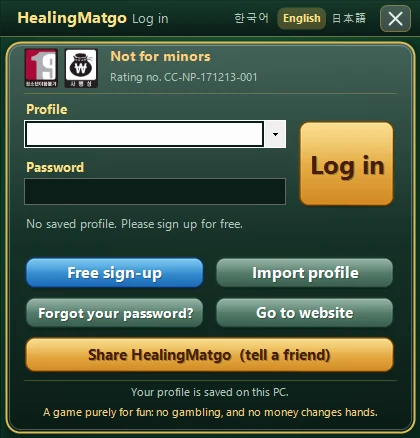
Next to the title bar at the top of the login window, 한국어 · English · 日本語 sit side by side. When you click the language you want, the text in the window changes right away. The language you are using now is highlighted.
② From the top of the game screen
While playing, click the small language button (KO · EN · JA) to the left of “Ad inquiries” at the top right of the screen. The “Language” selection window opens, and you click the language you want. A check mark (✓) appears next to the language you are using.
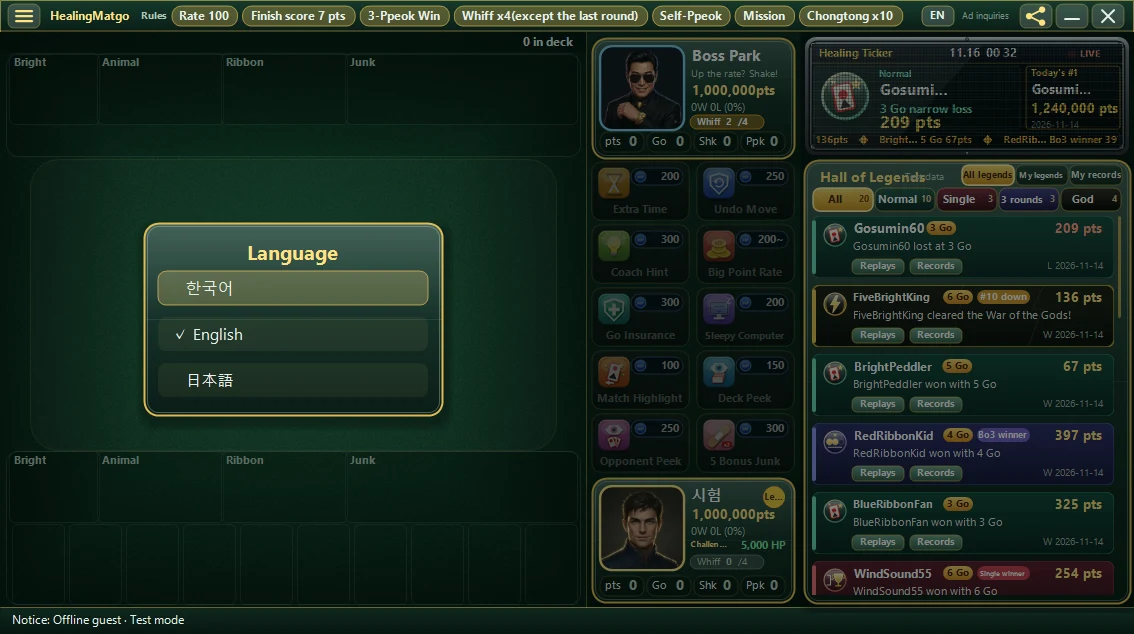
Only languages whose translation is complete appear as choices. If there is no language to choose from, the button does not appear. To check for a new version, see the article on checking for updates.
The language you choose is saved and stays the same the next time you start. If you change it after logging in, it is also saved to that profile.
3. What changes?
| What changes | What stays the same |
|---|---|
| Menu, button and guide text | Character voices (they stay in Korean) |
| Item names and descriptions | Nickname (exactly the text you chose) |
| First-run guide, popup messages | Hwatu pictures and score numbers |
| Opponent speech bubbles and feature tips | |
| Game record window (follows the game language) | |
| Desktop and Start menu icon names |
The icon name is created as 힐링맞고 / HealingMatgo / ヒーリング・マッゴ depending on the language. At update time, the icon in the same place is overwritten so that you do not end up with two icons.
Even if you switch to English or Japanese, the characters’ spoken voices are in Korean. Only the text (speech bubbles, menus) changes. If the sound bothers you, you can turn off “Voice” in the ☰ menu settings.
4. In which language are Hall of Legends posts made?
Hall of Legends posts on the website are made only once, in the language the person who uploaded the record was using. A round left in Korean becomes a Korean post, and a round left in English becomes an English post. The same post is not made separately in three languages. The website’s record list has All · 한국어 · English · 日本語 buttons so you can pick only the records in the language you want. The game record player inside a post also appears in the matching language.