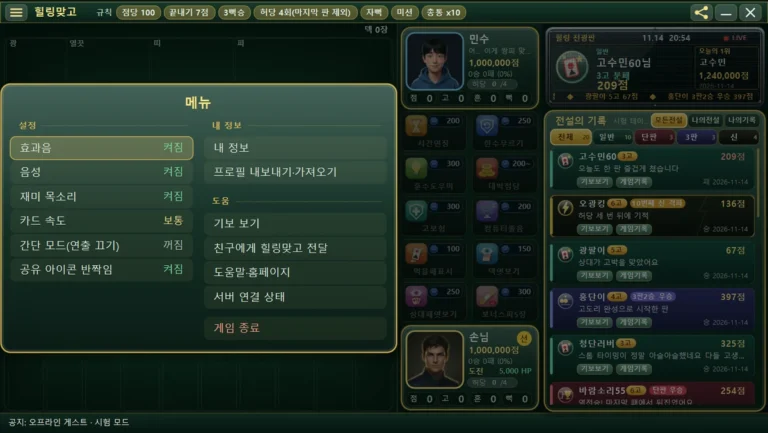
HealingMatgo scoreboard, HP and info column guide: pts · Go · Shk · Ppk badges and the Whiff chip
In the vertical line in the middle of the HealingMatgo screen are the opponent’s and your ‘info cards’. They are packed with numbers such as score, wins and losses, Whiff and HP, which feel unfamiliar at first, but once you learn how to read them, the flow of the round is clear at a glance. In this post we read them in this order: info card → score badges → HP → ticker and records column.
The names and numbers in the pictures are from a test screen made for explanation.
1. Reading one info card
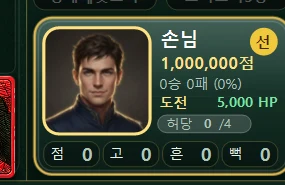
The upper card is the opponent (shown as ‘Minsu’ in the picture), and the lower card is you (shown as ‘Guest’ in the picture). The two cards have the same layout.
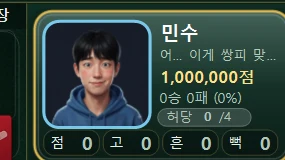
| What you see on the card | Meaning |
|---|---|
| Big face picture | The character’s portrait. Before a round starts, you can click it to change the character (choosing the opponent works only in Endless mode). |
| Name and one-line phrase | Under the opponent’s name, that character’s catchphrase appears in one line. |
| Yellow ‘○○ pts’ | The score you hold. It goes up and down as you win and lose rounds. We will explain below how it differs from HP. |
| ‘N W N L (win rate %)’ | Your record. For example, 0 W 0 L (0%) means you have not played a single round yet. |
| ‘Dealer’ circle | A yellow circle is attached next to the player who starts first in this round (the dealer). |
| ‘Whiff n/4’ chip | Shows how many Whiffs have piled up. We explain it below. |
| pts · Go · Shk · Ppk badges | Four boxes that count the current situation of this round. We explain them below. |
| Gold edge | The edge of the card of the player whose turn it is glows gold, as if breathing. |
2. The ‘pts · Go · Shk · Ppk’ badges
At the very bottom of the card there are four round boxes. They are gauges that count what has built up in this round.
| Badge | What it counts |
|---|---|
| pts | The score you have collected in this round so far |
| Go | The number of times you called ‘Go’ |
| Shk | The number of times you did Shake or Bomb |
| Ppeok | The number of times you made a Ppeok |
When a round starts, all of them start at 0. You can watch the ‘pts’ number on your card grow while you think about Go or Stop. For how the score is calculated, see the Scoring guide post.
3. How to read the Whiff chip
A small chip such as ‘Whiff 0/4’ shows how many Whiffs have piled up. A Whiff means you captured neither the card you played nor the card you flipped. A Ppeok also counts as one more Whiff. The player who piles up 4 Whiffs wins the round (a Whiff Win). However, a miss on your own last move (the 10th move, when you play out your hand) does not count as a Whiff. The Rules chip that says ‘Whiff 4 times (except the last round)’ refers to this rule.
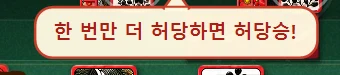
As Whiffs pile up, the chip’s color changes, and at 3/4 a speech bubble saying ‘One more Whiff and it’s a Whiff Win!’ may appear. For the detailed rule, see the Whiff Win post.
4. Things only on your card – win streak and HP
On your card there are two more things below the score line.
- Win streak mark – shown as ‘Challenge’ or ‘N-win streak’. If you see the word ‘Challenge’ as in the picture, it means you are not on a win streak yet.
- HP – the green number and the letters ‘HP’. HP (Healing Points) are points used to get items. When you gain some, coins fly in and the number slowly goes up.
The yellow ‘○○ pts’ is the score exchanged in rounds, and the green ‘HP’ are the Healing Points used when getting items. When you sign up, you receive 10,000 pts and 5,000 HP once. Even if your score changes in a round, your HP does not change along with it. For how to gain HP, see the HP and coins post.
5. Rules chips and the point rate
The ‘Point rate 100’ in the title bar means how many points each 1 point of score counts for in this round. When a round ends, points equal to ‘final score × point rate’ are exchanged. For example, if the final score is 14 pts and the point rate is 100, 1,400 pts change hands (it appears on the round result popup). ‘Finish score 7 pts’ means you are asked about Go/Stop once your score reaches 7 pts or more. The other chips (3-Ppeok Win, Self-Ppeok, Mission, Chongtong x10) are also marks that tell you which rules are on.
6. How to read the right column
Healing Ticker
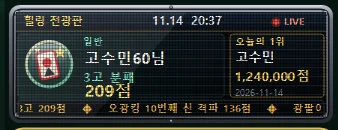
- Top: the ‘Healing Ticker’ letters, the current time, and ‘LIVE’ with a blinking red dot.
- Center left: the nickname, Go count and score of the most recently posted Hall of Legends record appear large.
- Center right: the nickname, score and date appear in the “Today’s #1” box.
- Bottom line: new news flows along as text. When a new Hall of Legends record is posted, a fireworks effect appears too.
Hall of Legends list
The big list below the ticker. One card holds the nickname, an ‘N Go’ badge, a result badge (for example ‘Single Match winner’ or ’10th god defeated’), the score, a one-line title and the date. Click [Replays] on a card to watch that round again from the start, and [Records] opens the website post.
| Top buttons | When you click |
|---|---|
| All legends | The records of everyone posted to the website (the default screen) |
| My legends | Only my records among them |
| My records | A window (popup) of the round records from the last month saved on my computer |
| All · Normal · Single · 3 rounds · Gods | Tabs by record type. The number is the number of records of that type |
For detailed usage, see the Hall of Legends and My records post. When the server is not connected, an ‘Offline’ mark appears, and ‘My legends’ shows a message that there is no connection.